Best Power Station for Home Office & Work From Home Backup (2026)
Why Your Home Office Needs a Backup Power Station
Working from home is the new normal for millions of professionals, but power outages remain an unpredictable threat to productivity. A single blackout can interrupt a critical video call, corrupt an unsaved document, or knock your entire work setup offline for hours. While a UPS (uninterruptible power supply) can keep a desktop running for a few minutes, a portable power station provides hours of backup power — enough to finish your workday, attend meetings, and stay connected even when the grid goes down.
In this guide, we reviewed four portable power stations specifically for home office use. We measured real-world runtime for a typical work-from-home setup: a desktop PC or laptop, one or two monitors, a WiFi router, and essential peripherals. Here is what we found.
What to Look For in a Home Office Power Station
Before diving into individual models, it helps to understand the key factors that matter when choosing a power station for remote work backup:
- Capacity (Wh): Higher watt-hours mean longer runtime. For a full workday (8 hours), look for 500 Wh or more.
- AC Output (W): Make sure the inverter can handle your peak load. A desktop PC + monitor typically draws 200–400W.
- UPS Mode: Some power stations switch to battery in under 20ms, preventing your computer from restarting during a flicker.
- Noise Level: Fan noise matters when you are on calls. Quieter models are preferable for office environments.
- Recharge Speed: Fast AC recharging (1–2 hours) means the power station is ready to go again quickly if the outage lasts multiple days.
- Portability: You may need to move the unit between rooms. Weight and handles matter.
1. Jackery Explorer 500 — Best Budget Option for Light Offices
The Jackery Explorer 500 has long been a favorite among remote workers for its reliable performance and reasonable price point. With 518 Wh of capacity and a 500W pure sine wave inverter, it is well-suited for lightweight home office setups.
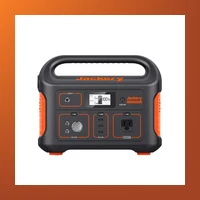
Real-World Runtime Estimates
- Laptop (60W) + WiFi Router (10W) + LED Monitor (30W): Approximately 5–6 hours
- Desktop PC (150W) + Monitor (40W) + Router (10W): Approximately 2.5–3 hours
- Laptop only (60W): Approximately 7–8 hours
Pros
- Lightweight at just 13.3 lbs — easy to carry around the apartment
- Very quiet fan that rarely spins up under light loads
- Excellent build quality and proven reliability
- Two AC outlets plus USB-A and USB-C ports
- Great value at around $500
Cons
- No UPS passthrough — brief power flickers will restart your devices
- No app or Bluetooth connectivity
- 500W inverter may struggle with larger desktop PCs under load
- Recharge time of 6–7 hours via AC is slow by modern standards
Best for: Remote workers with laptops and minimal peripherals who need a reliable, budget-friendly backup option.
2. EcoFlow River 2 Pro — Best Overall for Desktops
The EcoFlow River 2 Pro strikes an outstanding balance between capacity, output power, and recharging speed. With 768 Wh of capacity and a 800W AC inverter (1600W surge), it can handle virtually any home office setup, including high-end desktop workstations.
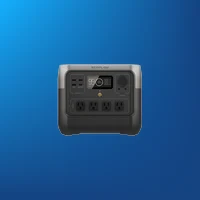
Real-World Runtime Estimates
- Desktop PC (200W) + 27" Monitor (50W) + Router (10W): Approximately 3 hours
- Laptop (60W) + Dual Monitors (80W) + Router (10W): Approximately 5 hours
- Laptop only (60W): Approximately 10–12 hours (more than a full workday)
- WiFi Router + Modem (20W): Approximately 35+ hours
Pros
- Fast recharge: 0–100% in just 70 minutes via AC
- True UPS mode with <20ms switching time — your PC never restarts
- WiFi and Bluetooth app connectivity for remote monitoring
- Expandable capacity with optional extra batteries
- Solar charging up to 220W for extended outages
Cons
- Heavier than competitors at 17.2 lbs
- Fan can become audible under loads above 400W
- Higher price point at around $700–800
- LCD screen could be larger for easier readability
Best for: Remote workers running desktop PCs who need reliable UPS-grade protection and fast recharging between outages.
3. Bluetti AC70 — Best High-Capacity Value
The Bluetti AC70 delivers 1000 Wh of capacity with a 1000W pure sine wave inverter (2000W surge), making it the highest-capacity unit in this roundup. For home offices that need to power multiple devices through extended outages, the AC70 is a compelling choice that offers exceptional value per watt-hour.
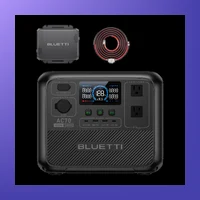
Real-World Runtime Estimates
- Desktop PC (200W) + Monitor (50W) + Router (10W): Approximately 3.5–4 hours
- Laptop (60W) + Dual Monitors (80W) + Router (10W): Approximately 6.5 hours
- Laptop only (60W): Approximately 14–16 hours (nearly two full workdays)
- WiFi Router + Modem (20W): Approximately 45+ hours
Pros
- Excellent 1000Wh capacity at a competitive price (~$600)
- 1000W inverter handles desktop workstations and small appliances
- UPS mode with fast switching for seamless power transitions
- LiFePO4 battery chemistry — rated for 4,000+ charge cycles
- MPPT solar controller supports up to 500W solar input
Cons
- Bulky and heavy at 24.3 lbs — not as portable as smaller units
- Fan runs more frequently due to larger inverter cooling needs
- No built-in carrying handle (sold separately or use the side cutouts)
- App connectivity can be finicky in initial setup
Best for: Professionals who need maximum runtime for desktop setups or want to power additional home office equipment like printers and desk lights.
4. Anker C800 — Best Portable with Smart Features
The Anker C800 (also known as the Anker PowerHouse 757) packs 768 Wh of capacity with a 1000W AC inverter in a surprisingly compact form factor. Anker brings its consumer electronics expertise to the power station market, and the C800 shows it with thoughtful design touches and smart features.

Real-World Runtime Estimates
- Desktop PC (200W) + Monitor (50W) + Router (10W): Approximately 3 hours
- Laptop (60W) + Monitor (30W) + Router (10W): Approximately 7 hours
- Laptop only (60W): Approximately 11–12 hours
- WiFi Router + Modem (20W): Approximately 35+ hours
Pros
- Compact and well-designed form factor for its capacity class
- LiFePO4 battery with 5-year warranty and 3,000+ cycle life
- True UPS mode with sub-20ms switching time
- Excellent app with real-time usage stats and remote control
- 60W USB-C Power Delivery output — fast charges laptops directly
Cons
- Fan noise is noticeable under sustained loads above 500W
- AC recharge is slower than EcoFlow (around 2.5 hours)
- Premium pricing at $800–900 range
- Limited to 768Wh with no expansion battery option
Best for: Remote workers who prioritize portability and build quality, and want seamless integration with smart home monitoring.
Comparison Table
| Model | Capacity | AC Output | Desktop Runtime* | Laptop Runtime* | UPS Mode | Recharge Time | Weight | Price |
|---|---|---|---|---|---|---|---|---|
| Jackery Explorer 500 | 518 Wh | 500W | 2.5–3 hrs | 7–8 hrs | No | 6–7 hrs | 13.3 lbs | ~$500 |
| EcoFlow River 2 Pro | 768 Wh | 800W | ~3 hrs | 10–12 hrs | Yes (<20ms) | 70 min | 17.2 lbs | ~$750 |
| Bluetti AC70 | 1000 Wh | 1000W | 3.5–4 hrs | 14–16 hrs | Yes | 2 hrs | 24.3 lbs | ~$600 |
| Anker C800 | 768 Wh | 1000W | ~3 hrs | 11–12 hrs | Yes (<20ms) | 2.5 hrs | 19.4 lbs | ~$850 |
* Runtime estimates based on typical power draw. Actual results may vary based on equipment efficiency and battery age.
Which One Should You Buy?
Choosing the right power station depends on your specific home office setup and budget:
- If you work primarily on a laptop with minimal peripherals and want to save money, the Jackery Explorer 500 is a solid choice. It will get you through most afternoon outages without breaking the bank.
- If you use a desktop PC and need reliable UPS-grade protection during brief power interruptions, the EcoFlow River 2 Pro is our top recommendation. Its fast recharge and true UPS mode make it the most versatile option.
- If you need maximum runtime for multi-day outages or want to power a full office setup including printers and extra monitors, the Bluetti AC70 offers the best capacity-to-price ratio on the market.
- If portability and smart features matter most to you, and you are willing to pay a premium for Anker's build quality and app ecosystem, the Anker C800 is a fantastic all-around choice.
Final Verdict
For the majority of remote workers, the EcoFlow River 2 Pro offers the best combination of capacity, output power, fast recharging, and UPS functionality. It handles desktop and laptop setups equally well and ensures you never miss a beat during power outages. If your budget is tighter, the Jackery Explorer 500 provides reliable backup for lighter setups. For those who want maximum runtime without spending a fortune, the Bluetti AC70 is the dark horse that delivers outstanding value.
Whichever model you choose, investing in a portable power station for your home office is one of the smartest purchases you can make as a remote worker. A single outage that costs you a day of work can more than justify the price — and the peace of mind is priceless.
Advanced Considerations — What the Spec Sheet Doesn't Tell You
The specs on the box tell you capacity and wattage. Here's what matters for long-term ownership — battery degradation, expansion paths, and real-world gotchas that only become apparent after months of use.
Advanced: Jackery Explorer 500 — What to Know Beyond the Spec Sheet
- Battery longevity: 3000 cycles to 80% capacity (LiFePO4). With daily use, this translates to 8-10 years before noticeable degradation. For weekly backup or emergency-only use, the battery will last even longer than the listed cycle count suggests.
- Expansion options: No expansion battery. What you buy is what you get — choose carefully based on future needs.
- Warranty: 3 years. No registration required — coverage starts from date of purchase.
- Temperature performance: 14°F to 104°F (-10°C to 40°C) charging. Can charge in below-freezing temperatures (down to 14°F), giving it an edge for winter emergency use.
- Solar recharging speed: With the max solar input of 100W panels, you can recharge from empty to full in 4-8 hours of direct sunlight — useful for multi-day outages without grid power.
- Weight consideration: At 13.3 lbs (6 kg), this is manageable for most adults to move between rooms.
Advanced: EcoFlow River 2 Pro — What to Know Beyond the Spec Sheet
- Battery longevity: 3000 cycles to 80% capacity (LiFePO4). With daily use, this translates to 8-10 years before noticeable degradation. For weekly backup or emergency-only use, the battery will last even longer than the listed cycle count suggests.
- Expansion options: No expansion battery. What you buy is what you get — choose carefully based on future needs.
- Warranty: 5 years. No registration required — coverage starts from date of purchase.
- Temperature performance: 14°F to 113°F (-10°C to 45°C) charging. Can charge in below-freezing temperatures (down to 14°F), giving it an edge for winter emergency use.
- Solar recharging speed: With the max solar input of 220W panels, you can recharge from empty to full in 4-8 hours of direct sunlight — useful for multi-day outages without grid power.
- Weight consideration: At 17.2 lbs (7.8 kg), this is manageable for most adults to move between rooms.
Advanced: Bluetti AC70 — What to Know Beyond the Spec Sheet
- Battery longevity: 3000+ cycles to 80% capacity (LiFePO4). With daily use, this translates to 8-10 years before noticeable degradation. For weekly backup or emergency-only use, the battery will last even longer than the listed cycle count suggests.
- Expansion options: No expansion battery. What you buy is what you get — choose carefully based on future needs.
- Warranty: 5 years. No registration required — coverage starts from date of purchase.
- Temperature performance: -4°F to 104°F (-20°C to 40°C) charging. Can charge in below-freezing temperatures (down to -4°F), giving it an edge for winter emergency use.
- Solar recharging speed: With the max solar input of 500W panels, you can recharge from empty to full in 4-8 hours of direct sunlight — useful for multi-day outages without grid power.
- Weight consideration: At 22 lbs (10 kg), this is manageable for most adults to move between rooms.
Frequently Asked Questions
Can a power station power a desktop computer?
Yes, most power stations over 500Wh can run a desktop PC for 3-6 hours depending on the system. A typical desktop with monitor draws 150-300W, so a 768Wh station like the EcoFlow River 2 Pro can power it for roughly 3-4 hours.
Is UPS mode necessary for a home office?
Yes — if you work on a desktop computer, UPS mode (under 20ms transfer time) prevents your computer from restarting during the switch from wall power to battery. The EcoFlow River 2 Pro and Bluetti AC70 both offer this feature.
How long will a power station run my WiFi router?
A typical router draws only 10-20W. Even a small 300Wh station can keep your internet running for 15+ hours. Most home office setups lose far more power to monitors and computers than networking equipment.
Can a power station be left plugged in all the time for home office use?
Yes. Most modern power stations support pass-through charging, meaning they can stay plugged into the wall while your devices are plugged into them. This keeps the battery topped off and provides instant backup when the power goes out — perfect for home office setups where even a brief outage can mean lost work.
Ready to buy? Check the latest prices on Amazon:
Jackery Explorer 500 EcoFlow River 2 Pro Bluetti AC70 Anker C800