Best Portable Power Station for Apartment Dwellers 2026 — Top 6 Picks
Why Apartment Dwellers Need a Different Kind of Power Station
If you live in an apartment, a gas generator isn't an option. Most buildings ban them for good reasons — carbon monoxide poisoning, fire risk, and noise complaints from neighbors. But that doesn't mean you should sit in the dark during the next blackout.
Portable power stations are the perfect solution for apartment dwellers. They're silent, emission-free, compact enough to fit in a closet, and powerful enough to run your fridge, lights, WiFi, and devices for hours or even days. Unlike gas generators, they require no fuel storage, no extension cords running through windows, and no maintenance schedule. You simply charge them from a wall outlet when the grid is up, and they're ready to go when it isn't.
In this guide, we break down the 6 best portable power stations for apartment living. Every pick was evaluated on four apartment-specific criteria: physical footprint and weight, noise level during operation, usable capacity for real-world appliances, and value relative to what you actually get. Whether you live in a 300-square-foot studio or a spacious three-bedroom, there's a power station here that fits your space and your budget.
The 6 Best Power Stations for Apartments
1. Jackery Explorer 1000 v2 — Best Overall
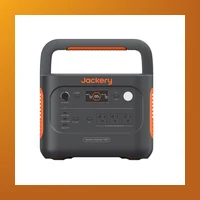
Jackery Explorer 1000 v2
$999 · 1,070 Wh · 1,500 W output · 22 lbs · LiFePO₄ battery
Best for: Most apartment dwellers who want reliable backup without breaking the bank.
The Jackery Explorer 1000 v2 nails the balance between capacity, weight, and price. At just 22 lbs, it's the lightest 1,000Wh-class station — easy to carry from your closet to the living room. The updated LiFePO₄ battery lasts 4,000+ cycles (that's over a decade of weekly use) and supports UPS mode with a 20ms transfer time, meaning your desktop computer or network equipment won't skip a beat when the power flickers.
In real-world apartment use, the Explorer 1000 v2 runs a mini fridge for 8+ hours, a WiFi router for 30+ hours, and charges phones and laptops simultaneously without breaking a sweat. The cooling fan is whisper-quiet — barely audible during light loads and still unobtrusive at near-maximum output. For context, most apartment dwellers report the fan noise blends into ambient background sound at roughly 30-35 dB under normal load.
The 1,500 W pure sine wave inverter handles everything from LED lamps to microwave ovens. Two AC outlets, two USB-C ports (one with 100W PD for fast laptop charging), a car port, and DC barrel outputs give you plenty of connectivity for a typical apartment setup. The only real drawback is the lack of expansion capability — unlike some competitors, you cannot add an extra battery pack later. But for the vast majority of apartment users, 1,070 Wh is sufficient for an overnight outage without needing more.
| Specification | Detail |
|---|---|
| Battery Capacity | 1,070 Wh (LiFePO₄) |
| AC Output | 1,500 W (3,000 W surge) |
| Weight | 22 lbs |
| AC Outlets | 2 |
| USB-C | 2 (100W PD + 15W) |
| Recharge Time | ~2 hours (AC) |
| Cycle Life | 4,000 cycles to 80% capacity |
| Warranty | 3 years |
✅ Pros
- Lightest in class (22 lbs)
- LiFePO₄ battery (4,000 cycles)
- Very quiet operation
- UPS mode with 20ms switchover
- Fast AC recharge (~2 hours)
❌ Cons
- Not expandable
- Only 2 AC outlets
- No app connectivity
2. EcoFlow River 2 Pro — Best Budget
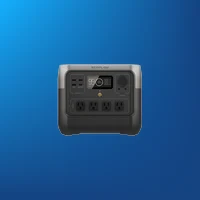
EcoFlow River 2 Pro
$549 · 768 Wh · 800 W output · 17 lbs · LiFePO₄ battery
Best for: Small apartments on a budget, or as a dedicated device for essentials only.
Think of the River 2 Pro as the "just enough" power station. At 17 lbs and roughly the size of a small microwave, it's one of the lightest and most compact options on the market. It handles the essentials — a fridge for 6 hours, WiFi for 20+ hours, phone charging — without paying for capacity you don't need. For apartment dwellers who have experienced only brief outages (under 8 hours), this is often all you'll ever need.
EcoFlow's X-Stream charging technology is a standout feature here. You get to 80% in just 50 minutes and a full charge in about 70 minutes. This matters more than you might think: if a storm is rolling in and you forgot to charge, 15 minutes on the outlet gives you enough juice to run your router and charge phones through an evening outage.
The River 2 Pro also includes EcoFlow's app connectivity via Bluetooth and WiFi. You can monitor battery level, adjust charge speeds, and control outlets remotely. The 800 W pure sine wave inverter is enough for most apartment appliances, though you won't be running a microwave or space heater. The fan is quiet during light loads but does become audible under sustained heavy draw — still much quieter than even a "quiet" inverter generator, however.
| Specification | Detail |
|---|---|
| Battery Capacity | 768 Wh (LiFePO₄) |
| AC Output | 800 W (1,600 W surge) |
| Weight | 17 lbs |
| AC Outlets | 3 |
| USB-C | 2 (60W PD + 15W) |
| Recharge Time | ~70 min (AC) |
| Cycle Life | 3,000 cycles to 80% capacity |
| Warranty | 2 years |
✅ Pros
- Very affordable at $549
- Fastest recharge in class (70 min full)
- Lightweight at 17 lbs
- App connectivity (Bluetooth + WiFi)
❌ Cons
- 800 W output limits larger appliances
- 768 Wh capacity for shorter outages
- No expansion option
3. Bluetti AC180 — Best Capacity Under $1,000
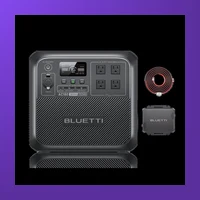
Bluetti AC180
$899 · 1,152 Wh · 1,800 W output · 37 lbs · LiFePO₄ battery
Best for: Larger apartments or extended outages where you need more power.
The Bluetti AC180 packs more capacity than any other model under $1,000 — 1,152 Wh. It's heavier at 37 lbs, but that extra weight translates to meaningful runtime. It can run a full-size refrigerator for 10+ hours, a CPAP machine for an entire night (12+ hours), and still have plenty of reserve for lights, phones, and a TV. If you live in a region prone to multi-day outages — think hurricane season or areas with aging grid infrastructure — the AC180's capacity edge is a genuine safety net.
The 1,800 W continuous output is the highest on this list, comfortably running a microwave (typically 1,000-1,200 W), toaster, or hair dryer — things smaller stations simply cannot handle. The AC180 supports both AC and solar charging (up to 500 W), and it includes a comprehensive array of ports: 4 AC outlets, 2 USB-C (100W PD), 2 USB-A, a car port, and wireless charging pad on top. Bluetti also offers a 2,400 W surge capacity for those moments when an appliance briefly draws more than its rated power on startup.
The main trade-off is weight and size. At 37 lbs, this isn't a "grab and go" device — you'll want to keep it in one spot and plug your essentials directly into it. The fan is also slightly more audible than the Jackery under high load, but it's still far quieter than any gas generator. For apartment dwellers who prioritize runtime over portability, the AC180 is the best value proposition on the market right now.
| Specification | Detail |
|---|---|
| Battery Capacity | 1,152 Wh (LiFePO₄) |
| AC Output | 1,800 W (2,400 W surge) |
| Weight | 37 lbs |
| AC Outlets | 4 |
| USB-C | 2 (100W PD) |
| Recharge Time | ~1.5 hours (AC) |
| Cycle Life | 3,500+ cycles to 80% capacity |
| Warranty | 5 years |
✅ Pros
- Highest capacity under $1,000 (1,152 Wh)
- 1,800 W output runs large appliances
- 4 AC outlets
- 5-year warranty
- Wireless charging pad
❌ Cons
- Heavy at 37 lbs
- Fan noise louder than competitors at high load
- Not expandable
4. Anker Solix C1000 — Best Compact Design
Anker Solix C1000
$799 · 1,056 Wh · 1,200 W output · 27 lbs · LiFePO₄ battery
Best for: Apartments with limited floor or closet space.
Anker designed the Solix C1000 with a noticeably smaller footprint than any other 1,000 Wh-class station on the market. It measures roughly 14 x 10 x 10 inches — compact enough to slide onto a closet shelf, tuck under a coffee table, or fit between a couch and wall. For apartment dwellers who are tight on square footage, this space efficiency is a significant advantage.
The Solix C1000 charges from 0 to 100% in just 58 minutes via AC — the fastest full recharge on this list. Anker's proprietary HyperFlash technology makes it possible, and it's genuinely useful for apartment dwellers who may only have a short window to charge before an expected outage. The LiFePO₄ battery is rated for 3,000 cycles, and Anker backs the unit with a 5-year warranty.
Output is limited to 1,200 W, which handles a fridge, lights, TV, and devices without issue but won't run a microwave at full power. The ergonomic handle and 27 lb weight make it easy to move between rooms. The integrated carrying handle is better-designed than most — it doesn't dig into your palm the way some boxier stations do. App connectivity via Anker's mobile app gives you real-time battery monitoring, charge scheduling, and remote outlet control. For apartment dwellers who value aesthetics and compactness alongside performance, the Solix C1000 is an excellent choice.
| Specification | Detail |
|---|---|
| Battery Capacity | 1,056 Wh (LiFePO₄) |
| AC Output | 1,200 W (2,000 W surge) |
| Weight | 27 lbs |
| AC Outlets | 3 |
| USB-C | 2 (100W PD) |
| Recharge Time | ~58 min (AC) |
| Cycle Life | 3,000 cycles to 80% capacity |
| Warranty | 5 years |
✅ Pros
- Smallest footprint in 1,000 Wh class
- Fastest recharge at 58 minutes
- 5-year warranty
- Excellent handle design
❌ Cons
- 1,200 W output won't run high-draw appliances
- No expansion battery option
- App occasionally has connectivity issues
5. Jackery Explorer 300 Plus — Best for Micro-Apartments
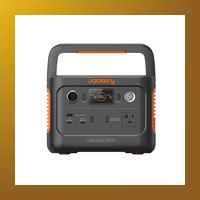
Jackery Explorer 300 Plus
$299 · 288 Wh · 300 W output · 8 lbs · LiFePO₄ battery
Best for: Studio apartments, dorm rooms, or powering just your devices.
At only 8 lbs and roughly the size of a shoebox (8 x 6 x 6 inches), the Explorer 300 Plus is purpose-built for micro-apartments, studio units, and dorm rooms where every square inch counts. It won't power a full-size refrigerator, but that's not what it's designed for. What it does is keep your phone, laptop, WiFi router, desk lamp, and a small fan running for 8-10 hours — covering the vast majority of what most people actually need during an outage.
The 300 W pure sine wave inverter handles small appliances like a mini fridge (compact bar-style, 50-70 W), a 32-inch LED TV (40-60 W), or a low-wattage space heater on its lowest setting. The LiFePO₄ battery is rated for 3,000 cycles, and the UPS mode switches to battery in under 20ms — fast enough to keep a desktop computer or network switch running through a blip.
One often-overlooked advantage of the Explorer 300 Plus is its portability for apartment dwellers who work remotely. You can keep it charged on your desk, use it as a UPS for your workstation, and toss it in a bag if you need to relocate to a coffee shop or coworking space during a prolonged outage (since the station itself can run your laptop for a full workday). At $299, it's an affordable entry point into backup power without the commitment of a larger, pricier unit.
| Specification | Detail |
|---|---|
| Battery Capacity | 288 Wh (LiFePO₄) |
| AC Output | 300 W (600 W surge) |
| Weight | 8 lbs |
| AC Outlets | 1 |
| USB-C | 1 (60W PD) |
| Recharge Time | ~2 hours (AC) |
| Cycle Life | 3,000 cycles to 80% capacity |
| Warranty | 2 years |
✅ Pros
- Ultra-light at 8 lbs — truly portable
- Shoebox-sized footprint
- Affordable at $299
- UPS mode with sub-20ms switchover
❌ Cons
- Can't power a full-size fridge
- Only 300 W inverter
- Single AC outlet
6. EcoFlow Delta 2 — Best Expandable System

EcoFlow Delta 2
$1,099 · 1,024 Wh (expandable to 2,048 Wh) · 1,800 W output · 27 lbs · LiFePO₄ battery
Best for: Apartment dwellers who want the option to scale up later.
The EcoFlow Delta 2 is the most future-proof option on this list. Start with the base unit at 1,024 Wh, and if you move to a larger apartment or simply need longer runtime, add an extra battery (EcoFlow's DELTA 2 Extra Battery, ~$799) for a total of 2,048 Wh. That modular approach means you're not locked into a single capacity — you can grow your backup power as your needs evolve.
The 1,800 W inverter handles the same heavy appliances as the Bluetti AC180, including microwaves and toasters. But the Delta 2 adds EcoFlow's signature X-Boost mode, which lets you run devices drawing up to 2,400 W by intelligently managing the power draw — useful for the occasional high-demand appliance without tripping the inverter.
Recharge speed is impressive: 0 to 80% in 50 minutes via AC, or you can pair it with up to 500 W of solar panels for off-grid charging. The 6 AC outlets give you more flexibility than any other model on this list — no need for power strips to plug in everything. The app is one of the most polished in the industry, with real-time monitoring, charge scheduling (charge during off-peak hours to save on electricity), and individual outlet control. The 5-year warranty provides peace of mind that you won't get from shorter warranty periods.
The only significant downside is the price. At $1,099 for the base unit (and ~$1,900 with the extra battery), it's the most expensive option here. But if you value expandability and want a system that can scale with your situation, the Delta 2 is unmatched.
| Specification | Detail |
|---|---|
| Battery Capacity | 1,024 Wh (expandable to 2,048 Wh) |
| AC Output | 1,800 W (2,400 W X-Boost) |
| Weight | 27 lbs (base unit) |
| AC Outlets | 6 |
| USB-C | 2 (100W PD) |
| Recharge Time | ~80 min (AC full) |
| Cycle Life | 3,000 cycles to 80% capacity |
| Warranty | 5 years |
✅ Pros
- Expandable from 1,024 to 2,048 Wh
- 6 AC outlets — most on this list
- X-Boost handles up to 2,400 W
- 5-year warranty
- Excellent app with scheduling
❌ Cons
- Expensive — especially with extra battery
- Heavier than average at 27 lbs
- More features than some users need
Full Product Comparison Table
| Model | Price | Capacity | Output | Weight | AC Ports | Recharge | Warranty | Expandable |
|---|---|---|---|---|---|---|---|---|
| Jackery Explorer 1000 v2 | $999 | 1,070 Wh | 1,500 W | 22 lbs | 2 | ~2 hrs | 3 yr | No |
| EcoFlow River 2 Pro | $549 | 768 Wh | 800 W | 17 lbs | 3 | ~70 min | 2 yr | No |
| Bluetti AC180 | $899 | 1,152 Wh | 1,800 W | 37 lbs | 4 | ~1.5 hrs | 5 yr | No |
| Anker Solix C1000 | $799 | 1,056 Wh | 1,200 W | 27 lbs | 3 | ~58 min | 5 yr | No |
| Jackery Explorer 300 Plus | $299 | 288 Wh | 300 W | 8 lbs | 1 | ~2 hrs | 2 yr | No |
| EcoFlow Delta 2 | $1,099 | 1,024 Wh | 1,800 W | 27 lbs | 6 | ~80 min | 5 yr | Yes (to 2,048 Wh) |
This comparison table gives you a side-by-side view of the critical specifications. Pay closest attention to capacity (Wh) and weight — these two factors most directly affect whether a station works for your apartment. A station that's too heavy to move or too big to store will end up collecting dust in a corner. Similarly, make sure the AC output (in watts) exceeds the total wattage of everything you plan to plug in simultaneously.
How Much Power Do You Actually Need?
One of the most common questions from apartment dwellers is, "How big of a power station do I really need?" The honest answer depends on what you want to keep running. Below is a runtime table based on real-world power draws for typical apartment appliances. Use this to estimate how long each power station will keep your essentials running during an outage.
These figures assume continuous draw at the appliance's average rated power. Actual runtime will vary based on efficiency, ambient temperature, battery age, and whether you're running multiple devices simultaneously. Inverters are roughly 85-90% efficient, so we've factored that into the estimates below.
| Appliance | Avg. Power Draw | Jackery 1000 v2 (1,070 Wh) | EcoFlow R2 Pro (768 Wh) | Bluetti AC180 (1,152 Wh) | Anker C1000 (1,056 Wh) | Jackery 300 Plus (288 Wh) | EcoFlow Delta 2 (1,024 Wh) |
|---|---|---|---|---|---|---|---|
| Smartphone (x2) | 10 W | 85+ charges | 60+ charges | 90+ charges | 80+ charges | 22+ charges | 80+ charges |
| Laptop (60W USB-C) | 60 W | 14-16 hrs | 10-11 hrs | 15-17 hrs | 14-15 hrs | 3-4 hrs | 13-15 hrs |
| WiFi Router | 15 W | 55-60 hrs | 40-45 hrs | 60-65 hrs | 55-60 hrs | 15-17 hrs | 55-58 hrs |
| Mini Fridge (3.2 cu ft) | 65 W avg | 12-14 hrs | 9-10 hrs | 14-16 hrs | 12-14 hrs | — | 12-13 hrs |
| Full-Size Fridge (18 cu ft) | 150 W avg | 5-6 hrs | 4-5 hrs | 6-7 hrs | 5-6 hrs | — | 5-6 hrs |
| LED TV (50-inch) | 80 W | 10-12 hrs | 7-8 hrs | 11-13 hrs | 10-12 hrs | 2-3 hrs | 10-11 hrs |
| CPAP Machine (heated humidifier) | 60 W | 14-16 hrs | 10-11 hrs | 15-17 hrs | 14-15 hrs | 3-4 hrs | 13-15 hrs |
| Desk Lamp (LED) | 10 W | 85-90 hrs | 60-65 hrs | 90-95 hrs | 85-88 hrs | 22-25 hrs | 82-85 hrs |
| Microwave (1,000 W) | 1,200 W | ~45 min | — | ~50 min | ~45 min | — | ~45 min |
| Box Fan (20-inch) | 75 W | 11-13 hrs | 8-9 hrs | 12-14 hrs | 11-13 hrs | 2-3 hrs | 11-12 hrs |
How to use this table: Add up the runtimes for the appliances you'd need simultaneously. For example, if you want to run a mini fridge (14 hrs on the AC180), a WiFi router (65 hrs), and charge two smartphones (90+ charges), you can comfortably do all of that for a full day on the Bluetti AC180. If you only need your laptop and phone charged and the WiFi running for a workday, the Jackery Explorer 300 Plus is plenty.
How to Choose the Right Size for Your Apartment
| Apartment Type | Recommended Capacity | What You Can Power | Top Pick |
|---|---|---|---|
| Studio / Micro | 200-500 Wh | Phone, laptop, WiFi, lamp (8-12 hrs) | Jackery Explorer 300 Plus |
| 1-Bedroom | 500-1,000 Wh | Fridge, WiFi, devices, 2-3 lights (6-10 hrs) | Jackery Explorer 1000 v2 |
| 2+ Bedroom | 1,000-2,000 Wh | Fridge, CPAP, TV, WiFi, lights (8-12 hrs) | Bluetti AC180 or EcoFlow Delta 2 |
Rule of thumb: Most apartment outage scenarios need 500-1,000 Wh for a comfortable 8-12 hour experience. Start with this range unless you have specific high-power needs like running a CPAP machine, powering a home office server, or living in an area with multi-day outages. The most common mistake apartment buyers make is over-buying — a 2,000+ Wh station is heavy, expensive, and takes up significant floor space that most apartments simply don't have.
Also consider noise. While all the stations on this list are much quieter than gas generators, some are nearly silent under light loads (Jackery, Anker) while others have more noticeable fan activity (Bluetti AC180 under heavy draw). If you're a light sleeper planning to run the station in your bedroom to power a CPAP or fan, prioritize models with documented quiet operation.
Advanced Considerations — What the Spec Sheet Doesn't Tell You
The specs on the box tell you capacity and wattage. Here's what matters for long-term ownership — battery degradation, expansion paths, and real-world gotchas that only become apparent after months of use.
Advanced: Jackery Explorer 1000 v2 — What to Know Beyond the Spec Sheet
- Battery longevity: 3000 cycles to 80% capacity (LiFePO4). With daily use, this translates to 8-10 years before noticeable degradation. For weekly backup or emergency-only use, the battery will last even longer than the listed cycle count suggests.
- Expansion options: No expansion battery (fixed capacity). What you buy is what you get — choose carefully based on future needs.
- Warranty: 3 years (5 years with registration). Make sure to register within 30 days of purchase to activate the full warranty period.
- Temperature performance: 14°F to 104°F (-10°C to 40°C) charging. Can charge in below-freezing temperatures (down to 14°F), giving it an edge for winter emergency use.
- Solar recharging speed: With the max solar input of 400W panels, you can recharge from empty to full in 4-8 hours of direct sunlight — useful for multi-day outages without grid power.
- Weight consideration: At 22 lbs (10 kg), this is manageable for most adults to move between rooms.
Advanced: EcoFlow River 2 Pro — What to Know Beyond the Spec Sheet
- Battery longevity: 3000 cycles to 80% capacity (LiFePO4). With daily use, this translates to 8-10 years before noticeable degradation. For weekly backup or emergency-only use, the battery will last even longer than the listed cycle count suggests.
- Expansion options: No expansion battery. What you buy is what you get — choose carefully based on future needs.
- Warranty: 5 years. No registration required — coverage starts from date of purchase.
- Temperature performance: 14°F to 113°F (-10°C to 45°C) charging. Can charge in below-freezing temperatures (down to 14°F), giving it an edge for winter emergency use.
- Solar recharging speed: With the max solar input of 220W panels, you can recharge from empty to full in 4-8 hours of direct sunlight — useful for multi-day outages without grid power.
- Weight consideration: At 17.2 lbs (7.8 kg), this is manageable for most adults to move between rooms.
Advanced: Bluetti AC180 — What to Know Beyond the Spec Sheet
- Battery longevity: 3000+ cycles to 80% capacity (LiFePO4). With daily use, this translates to 8-10 years before noticeable degradation. For weekly backup or emergency-only use, the battery will last even longer than the listed cycle count suggests.
- Expansion options: Supports B180 expansion (+1800Wh, $549). This matters if your power needs grow over time — you can add capacity without replacing the entire unit.
- Warranty: 5 years. No registration required — coverage starts from date of purchase.
- Temperature performance: -4°F to 104°F (-20°C to 40°C) charging. Can charge in below-freezing temperatures (down to -4°F), giving it an edge for winter emergency use.
- Solar recharging speed: With the max solar input of 500W panels, you can recharge from empty to full in 4-8 hours of direct sunlight — useful for multi-day outages without grid power.
- Weight consideration: At 37 lbs (16.8 kg), this is on the heavier side — consider keeping it on a rolling cart or in its final location.
Advanced: EcoFlow Delta 2 — What to Know Beyond the Spec Sheet
- Battery longevity: 3000 cycles to 80% capacity (LiFePO4). With daily use, this translates to 8-10 years before noticeable degradation. For weekly backup or emergency-only use, the battery will last even longer than the listed cycle count suggests.
- Expansion options: Supports extra battery (DB2000, +2048Wh, $699). This matters if your power needs grow over time — you can add capacity without replacing the entire unit.
- Warranty: 5 years. No registration required — coverage starts from date of purchase.
- Temperature performance: 14°F to 113°F (-10°C to 45°C) charging. Can charge in below-freezing temperatures (down to 14°F), giving it an edge for winter emergency use.
- Solar recharging speed: With the max solar input of 500W panels, you can recharge from empty to full in 4-8 hours of direct sunlight — useful for multi-day outages without grid power.
- Weight consideration: At 27 lbs (12 kg), this is manageable for most adults to move between rooms.
Frequently Asked Questions
Can I use a portable power station indoors in an apartment?
Yes. Unlike gas generators, portable power stations produce zero emissions. They use sealed lithium iron phosphate (LiFePO₄) or lithium-ion batteries with no combustion, no exhaust, and no carbon monoxide. You can safely operate them in any room of your apartment, including bedrooms and living rooms. Just ensure the ventilation openings on the unit are not blocked, as the cooling fan needs airflow to prevent overheating during sustained high loads.
How long does a power station take to charge from a wall outlet?
It varies by model. The Anker Solix C1000 is the fastest at 58 minutes for a full charge. The EcoFlow River 2 Pro takes about 70 minutes. The Jackery Explorer 1000 v2 and Bluetti AC180 take roughly 1.5-2 hours. Most units deliver 80% charge significantly faster than full charge — useful if you only have a short window before an expected outage. We recommend keeping your power station at 80% or higher charge during storm seasons.
Can I leave my power station plugged in all the time?
Yes. All modern portable power stations with LiFePO₄ batteries include intelligent battery management systems (BMS) that prevent overcharging. When the battery reaches 100%, the unit stops drawing power and switches to "pass-through" mode, sending grid power directly to the AC outlets. This makes them safe to use as always-on UPS devices for your modem, router, and desktop computer. The BMS also manages temperature and voltage to maximize battery lifespan.
Will a power station run my microwave or air conditioner?
Microwaves: Yes, but only if the station's inverter can handle the wattage. A typical 1,000 W microwave draws roughly 1,200 W including inverter overhead. The Bluetti AC180 (1,800 W) and EcoFlow Delta 2 (1,800 W) can handle this. The Jackery Explorer 1000 v2 (1,500 W) can also run most microwaves, though you'll need to avoid running other high-draw devices simultaneously. Air conditioners: Generally no for window AC units, which draw 900-1,500 W with a large startup surge that most portable stations can't handle. Small personal fans or evaporative coolers are manageable.
How do I store a portable power station in a small apartment?
Most units can be stored in a closet, under a desk, or on a shelf. Avoid storing them in direct sunlight, near radiators or heaters, or in areas that exceed 110°F (43°C). The ideal storage temperature is 32-86°F (0-30°C). If you plan to store the unit for more than three months without use, discharge it to roughly 50-60% capacity — lithium batteries degrade fastest when stored fully charged or fully depleted for extended periods.
What's the difference between LiFePO₄ and standard lithium-ion batteries?
LiFePO₄ (lithium iron phosphate) is safer and lasts significantly longer than standard lithium-ion (typically NMC or NCA chemistry). LiFePO₄ batteries are rated for 3,000-4,000 charge cycles before dropping to 80% capacity, compared to 500-1,000 cycles for standard lithium-ion. They are also more thermally stable — they won't catch fire or explode if punctured or overheated. All the stations on this list use LiFePO₄, which is the right choice for apartment use where safety is paramount.
Can I take my power station on an elevator or up stairs?
Yes for most models under 40 lbs. The Jackery Explorer 300 Plus (8 lbs) and EcoFlow River 2 Pro (17 lbs) are easily carried one-handed. The Jackery Explorer 1000 v2 (22 lbs) is manageable for most people. The Bluetti AC180 (37 lbs) is heavier but still liftable — treat it like carrying a large cat or a small dumbbell. If you live on a higher floor without elevator access, we recommend sticking with models under 30 lbs for safety and convenience.
How long will the battery last if I don't use it?
LiFePO₄ batteries self-discharge at about 2-3% per month, meaning you'll lose roughly 1-2% capacity per month of storage. After six months of sitting unused, the station will still have 85-90% of its original charge. We recommend checking the charge level every 2-3 months and topping it up to 60% if it drops below 30%. This keeps the battery healthy and ensures the station is ready when you need it.
Final Verdict
For most apartment dwellers, the Jackery Explorer 1000 v2 is the sweet spot — light enough to carry at 22 lbs, powerful enough for a full day of backup with 1,070 Wh capacity, and quiet enough to use while you sleep. It represents the best balance of the four apartment-friendly criteria: compact size, silent operation, real-world runtime, and reasonable price.
If budget is your primary concern, the EcoFlow River 2 Pro covers the essentials at $549 with the fastest recharge in class. If you need maximum runtime for multi-day outages, the Bluetti AC180 delivers the best capacity-per-dollar under $1,000. For those in micro-apartments or dorm rooms, the Jackery Explorer 300 Plus is a compact, affordable entry point. And if you want room to grow, the EcoFlow Delta 2 is the only expandable option that scales from 1,024 Wh to 2,048 Wh as your needs evolve.
No matter which model you choose, any of these six stations will keep your lights on, your food cold, and your devices charged during the next blackout — without the noise, fumes, or fire risk of a gas generator. That's the peace of mind that apartment-friendly backup power is all about.