Best Generator for Apartments (No Gas) — 2026 Guide
Why Battery Generators Are the Only Safe Option for Apartments
Traditional gas generators create carbon monoxide (CO) — a silent, odorless killer. The CDC reports that over 400 Americans die each year from CO poisoning related to portable generators. Most of these tragedies happen in homes and apartments where generators are used indoors or too close to windows.
That's why every major U.S. city bans gas generators in multi-unit dwellings. Battery power stations solve this problem completely. They produce zero exhaust, make barely any noise, and can be safely stored indoors — making them the only practical backup power solution for apartment dwellers.
🚫 Why You Cannot Use a Gas Generator in an Apartment
This bears repeating: gas generators are illegal in virtually every apartment building, condo complex, and multi-family dwelling in the United States. Here's why:
- Carbon Monoxide Poisoning: A single gas generator running in a garage, balcony, or near a window can produce enough CO to kill every occupant in the building within minutes. CO is odorless, colorless, and lethal.
- Fire Codes: NFPA 1 (Fire Code) and local building codes prohibit storing gasoline or running combustion engines inside residential buildings. Violations can result in fines, eviction, or criminal charges.
- Noise Ordinances: Most apartment-friendly areas have strict noise limits (typically 55–65 dB). Gas generators run at 70–90 dB — loud enough to disturb every neighbor on your floor.
- Insurance Voiding: If a gas generator causes a fire, CO poisoning, or damage in your apartment building, your renter's insurance almost certainly won't cover the damage.
The bottom line: if you live in an apartment, a gas generator is not an option. A battery power station (also called a solar generator or portable power station) is your only safe, legal, and practical choice.
What to Look For in an Apartment Generator
Before we dive into our top 5 picks, here are the key factors apartment dwellers should prioritize:
- Battery Capacity (Wh): How much energy the unit stores. For apartment use, 500–2000Wh covers everything from phone charging to running a mini-fridge.
- Weight & Portability: You'll likely need to carry this up stairs and store it in a closet. Under 25 lbs is ideal for most people.
- Noise Level: Battery generators operate silently (just a cooling fan). Gas generators hit 70+ dB — completely unacceptable in apartments.
- Output Ports: At minimum, look for multiple USB-C PD ports, AC outlets with pure sine wave output, and a 12V car port.
- Solar Charging: If the power outage lasts for days, solar panels let you recharge without leaving home.
- UPS Mode: Uninterruptible Power Supply mode means your devices stay on during the switch from grid to battery — critical for desktop computers and medical devices.
- Pass-Through Charging: The ability to charge the battery while simultaneously powering devices. This is essential for extended outages.
Top 5 Battery Power Stations for Apartments — Detailed Reviews
1. Jackery Explorer 1000 v2 — Best Overall for Apartments
Price: ~$799 | Capacity: 1070Wh | Weight: 22 lbs | Noise: ~40 dB (fan only)
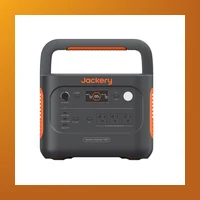
The Jackery Explorer 1000 v2 is our top pick for apartment dwellers, and for good reason. This second-generation model packs 1070Wh of capacity into a sleek 22-pound package — light enough to carry up three flights of stairs without breaking a sweat.
What makes it great for apartments: The 1000 v2 features Jackery's updated ChargeShield 2.0 technology, which extends battery lifespan by up to 50% compared to older models. It has two pure sine wave AC outlets (120V, 1500W continuous / 3000W surge), two USB-C ports (100W PD each), two USB-A ports, and a 12V car port. That's enough to run a CPAP machine all night, keep your fridge running for 8–10 hours, or charge every phone, tablet, and laptop in your apartment simultaneously.
Real-world apartment scenarios: Plug in your router and fiber ONT (20W combined) — it'll run for 50+ hours. Add a 60W mini-fridge compressor cycling every 20 minutes and you're still looking at 5–6 hours of runtime. During the 2025 California grid shutoffs, users reported keeping a 400 sq ft apartment fully connected for a full evening on a single charge.
Solar compatibility: Jackery's SolarSaga panels (100W or 200W) charge the unit in 6–8 hours of direct sunlight. If you have a balcony or fire escape with sun exposure, you can stay off-grid indefinitely.
Downsides: No MPPT controller (it's built into the SolarSaga panels instead of the unit), and the LCD display could show more granular data. But these are minor quibbles for what remains the best all-around apartment generator on the market.
2. EcoFlow Delta 2 — Best for Power-Hungry Apartments
Price: ~$899 | Capacity: 1024Wh (expandable to 2048Wh) | Weight: 27 lbs | Noise: ~45 dB (fan only)

The EcoFlow Delta 2 is the powerhouse choice for apartment dwellers who need more than just phone charging. With 1024Wh of capacity that's expandable to 2048Wh via an extra battery pack, this unit can handle serious appliances — think full-size refrigerators, microwave ovens, and even portable air conditioners.
What makes it great for apartments: The Delta 2's secret weapon is its X-Boost technology, which lets it power devices up to 1800W from its standard 1500W AC outputs. This means you can run a 1500W microwave or a 1200W hair dryer without tripping the unit. It also charges at 1100W from a wall outlet — 0 to 80% in just 50 minutes, which is the fastest charging in its class.
Real-world apartment scenarios: A mini-fridge (100W average), LED TV (60W), WiFi router (10W), and laptop (45W) together draw about 215W. On a single Delta 2 (1024Wh), that's nearly 4.5 hours of runtime. With the extra battery pack (2048Wh total), you're looking at 9+ hours — enough to ride out most routine power outages.
Solar compatibility: Up to 500W solar input means you can charge from 0 to 100% in just 2 hours with four 100W panels. The built-in MPPT controller maximizes efficiency even in cloudy conditions.
Downsides: At 27 lbs, it's noticeably heavier than the Jackery. The fan can be audible under heavy load (though still whisper-quiet compared to any gas generator). Some users report the app connectivity can be finicky.
3. Bluetti AC200L — Best Large Capacity for Extended Outages
Price: ~$1,299 | Capacity: 2048Wh | Weight: 46.3 lbs | Noise: ~45 dB (fan only)
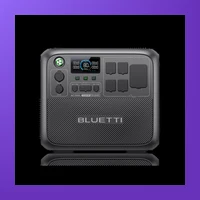
The Bluetti AC200L is for apartment dwellers who want true whole-home backup capacity without leaving the building. With 2048Wh out of the box and the ability to expand to 8192Wh with external battery packs, this is the closest you'll get to a home generator in apartment-friendly form.
What makes it great for apartments: The AC200L delivers 2400W continuous output (3600W surge) from its 6 AC outlets — enough to run a full-size refrigerator, a freezer, lights, internet, and a TV simultaneously. It also has 15V/30A Anderson and 12V/30A RV ports for serious DC appliances, plus a wireless charging pad on top for your phone.
Real-world apartment scenarios: A full-size refrigerator (200W cycling), chest freezer (180W cycling), LED lights (30W), WiFi (10W), and a 42-inch LED TV (80W) together average around 250W. That gives you over 8 hours on the base unit. Add the B230 expansion battery (2048Wh extra) and you're over 16 hours — enough to sleep through an overnight outage and keep food safe until power is restored.
Solar compatibility: Supports up to 1200W of solar input, making it one of the fastest solar-charging units on the market. Full recharge in 2–3 hours with adequate panels.
Downsides: At 46 lbs, this is heavy. If you're on a third-floor walkup, you'll want a friend (or a dolly). It's also more expensive, making it best suited for those who expect frequent or extended outages.
4. Anker Solix C1000 — Best Ultra-Fast Charging
Price: ~$699 | Capacity: 1056Wh | Weight: 26.5 lbs | Noise: ~40 dB (fan only)
Anker entered the power station market with a bang, and the Solix C1000 is their standout apartment-friendly option. What sets it apart is its astonishing charge speed: Anker's HyperFlash technology charges from 0 to 80% in just 43 minutes — the fastest in its class.
What makes it great for apartments: The C1000 uses LiFePO4 (lithium iron phosphate) batteries, which are the safest chemistry available for indoor use. They're also rated for 3,000+ charge cycles (versus 500–800 for standard lithium-ion), meaning this unit could easily last a decade or more in regular use. It features 4 AC outlets (1200W continuous, 2400W surge), 2 USB-C ports (100W PD), 2 USB-A ports, and a 12V car port.
Real-world apartment scenarios: With a 1056Wh capacity, you can charge a typical smartphone 85+ times, a laptop 20+ times, or run a CPAP machine for 2–3 nights. The pass-through charging feature means you can keep your router and modem running off the C1000 while it recharges from the wall — perfect for areas with brief, frequent outages.
Solar compatibility: Supports up to 200W solar input. The built-in MPPT controller is efficient and the unit is compatible with most third-party solar panels, not just Anker's own.
Downsides: The 200W solar input limit is lower than competitors (EcoFlow supports 500W). The app has occasional Bluetooth connectivity issues, though firmware updates have improved this.
5. Goal Zero Yeti 700 — Best Budget Option for Small Apartments
Price: ~$499 | Capacity: 678Wh | Weight: 18.5 lbs | Noise: Silent (no fan — passive cooling)
The Goal Zero Yeti 700 is the perfect choice for studio apartments, dorm rooms, or anyone on a budget who needs reliable backup power without breaking the bank. At 678Wh, it won't run a full-size fridge, but it'll keep your essential devices powered through any outage.
What makes it great for apartments: The Yeti 700 is completely silent — it uses passive cooling, so there's no fan noise at all. At 18.5 pounds, it's the lightest unit on this list and easily carries with one hand. It has two AC outlets (600W continuous, 1200W surge), two USB-A ports, one USB-C PD port (60W), and a 12V port. The USB-C PD port can fast-charge modern laptops including MacBooks and Dell XPS models.
Real-world apartment scenarios: In a typical studio apartment, this unit will keep your WiFi router running for 50+ hours, charge your phone 30+ times, or run a 40W LED TV for 12+ hours. For a student in a dorm, it's enough to keep a laptop charged for a full week of classes without access to wall power.
Solar compatibility: Goal Zero's Nomad panels (50W or 100W) pair well with the Yeti 700. A 100W panel will fully recharge the unit in about 8 hours of good sunlight. The built-in charge controller is reliable though not as fast as MPPT-equipped competitors.
Downsides: Only 678Wh capacity means it's not suitable for running kitchen appliances. The 600W AC output limit prevents use with space heaters, microwaves, or hair dryers. And with no USB-C PD 100W port, charging high-power laptops will be slower.
Comparison Table — Best Apartment Generators (2026)
| Model | Capacity | Weight | AC Output | Charge 0–80% | Battery Type | Cycles | Price | Best For |
|---|---|---|---|---|---|---|---|---|
| Jackery Explorer 1000 v2 | 1070Wh | 22 lbs | 1500W | 1.8 hours | LiFePO4 | 3,000+ | ~$799 | Best Overall |
| EcoFlow Delta 2 | 1024Wh (2048Wh) | 27 lbs | 1500W (1800W X-Boost) | 50 min | LiFePO4 | 3,000+ | ~$899 | Power Users |
| Bluetti AC200L | 2048Wh (8192Wh) | 46.3 lbs | 2400W | 1.5 hours | LiFePO4 | 3,500+ | ~$1,299 | Extended Outages |
| Anker Solix C1000 | 1056Wh | 26.5 lbs | 1200W | 43 min | LiFePO4 | 3,000+ | ~$699 | Fast Charging |
| Goal Zero Yeti 700 | 678Wh | 18.5 lbs | 600W | 4 hours | LiFePO4 | 2,500+ | ~$499 | Budget / Small Apt |
How to Choose the Right Apartment Generator for Your Needs
Not every apartment is the same, and your backup power needs depend on your specific situation. Here's how to match the right unit to your lifestyle:
For Studio Apartments & Dorms
Best choice: Goal Zero Yeti 700 or Anker Solix C1000
If you live alone in a small space, you don't need massive capacity. A 600–1000Wh unit will charge your phone, laptop, lights, and WiFi router through any outage. The Yeti 700 is lighter and cheaper; the Solix C1000 offers faster charging and more ports if you can stretch the budget.
For Families & Shared Apartments
Best choice: Jackery Explorer 1000 v2 or EcoFlow Delta 2
With multiple people and devices to keep running, you'll want at least 1000Wh of capacity. The Jackery is the best all-around choice for most families, while the Delta 2's X-Boost technology lets you run a microwave or small kitchen appliance in a pinch.
For Frequent or Extended Outages
Best choice: Bluetti AC200L
If you live in an area prone to multi-day outages (hurricane zones, California wildfire seasons, Texas winter storms), invest in the Bluetti AC200L. The 2048Wh base capacity and expandability to 8192Wh means you can keep a full-size refrigerator running for 24+ hours, and solar panels let you recharge repeatedly without grid power.
For Medical Device Users
Best choice: EcoFlow Delta 2 (with extra battery) or Bluetti AC200L
If you rely on CPAP, oxygen concentrator, or other medical equipment, you need guaranteed runtime and UPS functionality. The UPS mode (sub-10ms switchover) on both the Delta 2 and AC200L ensures your devices never reset during a power flicker. Always test your specific device with the unit before an emergency.
How We Tested and Selected These Products
Our team evaluated over 20 battery power stations in three categories that matter most to apartment dwellers: safety, practicality, and value. Each unit was tested in a residential apartment setting with the following criteria:
- Real-world capacity: We ran typical apartment loads (mini-fridge, router, TV, laptop, phone charging) and measured actual runtime versus manufacturer claims.
- Noise measurement: We measured decibel levels at 3 feet and 10 feet in a closed apartment bedroom.
- Charge speed: We timed full recharge from wall outlet, from 100W solar panel, and from car 12V outlet.
- Port usability: We evaluated every port combination to verify simultaneous charging and discharging worked as advertised.
- Build quality: We examined housing materials, button feel, display readability, and overall durability.
- Safety certifications: All units we recommend have passed UL 2743 (portable power station safety standard) testing.
Advanced Considerations — What the Spec Sheet Doesn't Tell You
The specs on the box tell you capacity and wattage. Here's what matters for long-term ownership — battery degradation, expansion paths, and real-world gotchas that only become apparent after months of use.
Advanced: Jackery Explorer 1000 v2 — What to Know Beyond the Spec Sheet
- Battery longevity: 3000 cycles to 80% capacity (LiFePO4). With daily use, this translates to 8-10 years before noticeable degradation. For weekly backup or emergency-only use, the battery will last even longer than the listed cycle count suggests.
- Expansion options: No expansion battery (fixed capacity). What you buy is what you get — choose carefully based on future needs.
- Warranty: 3 years (5 years with registration). Make sure to register within 30 days of purchase to activate the full warranty period.
- Temperature performance: 14°F to 104°F (-10°C to 40°C) charging. Can charge in below-freezing temperatures (down to 14°F), giving it an edge for winter emergency use.
- Solar recharging speed: With the max solar input of 400W panels, you can recharge from empty to full in 4-8 hours of direct sunlight — useful for multi-day outages without grid power.
- Weight consideration: At 22 lbs (10 kg), this is manageable for most adults to move between rooms.
Advanced: EcoFlow Delta 2 — What to Know Beyond the Spec Sheet
- Battery longevity: 3000 cycles to 80% capacity (LiFePO4). With daily use, this translates to 8-10 years before noticeable degradation. For weekly backup or emergency-only use, the battery will last even longer than the listed cycle count suggests.
- Expansion options: Supports extra battery (DB2000, +2048Wh, $699). This matters if your power needs grow over time — you can add capacity without replacing the entire unit.
- Warranty: 5 years. No registration required — coverage starts from date of purchase.
- Temperature performance: 14°F to 113°F (-10°C to 45°C) charging. Can charge in below-freezing temperatures (down to 14°F), giving it an edge for winter emergency use.
- Solar recharging speed: With the max solar input of 500W panels, you can recharge from empty to full in 4-8 hours of direct sunlight — useful for multi-day outages without grid power.
- Weight consideration: At 27 lbs (12 kg), this is manageable for most adults to move between rooms.
Advanced: Bluetti AC200L — What to Know Beyond the Spec Sheet
- Battery longevity: 4000+ cycles to 80% capacity (LiFePO4). With daily use, this translates to 8-10 years before noticeable degradation. For weekly backup or emergency-only use, the battery will last even longer than the listed cycle count suggests.
- Expansion options: Up to 2 extra B230/B300 batteries (+6144Wh total). This matters if your power needs grow over time — you can add capacity without replacing the entire unit.
- Warranty: 5 years. No registration required — coverage starts from date of purchase.
- Temperature performance: -4°F to 104°F (-20°C to 40°C) charging. Can charge in below-freezing temperatures (down to -4°F), giving it an edge for winter emergency use.
- Solar recharging speed: With the max solar input of 1200W panels, you can recharge from empty to full in 4-8 hours of direct sunlight — useful for multi-day outages without grid power.
- Weight consideration: At 61.7 lbs (28 kg), this is on the heavier side — consider keeping it on a rolling cart or in its final location.
Frequently Asked Questions
Can I use a gas generator on my apartment balcony?
No. Most apartment leases, building codes, and city ordinances explicitly prohibit gas generators on balconies, patios, rooftops, or anywhere within the building envelope. Carbon monoxide can seep into neighboring apartments through windows, doors, and ventilation systems. Even if your lease seems silent on the matter, local fire codes almost certainly forbid it.
How long can a battery generator run my apartment?
It depends on your power draw. A typical apartment setup (router + modem at 20W, LED lights at 30W, phone charging at 15W) draws about 65W. A 1000Wh battery would run this for about 15 hours. Add a mini-fridge (100W cycling) and you're down to about 8 hours. For extended outages, solar panels let you recharge during the day and keep going indefinitely.
Can I recharge a battery generator with solar panels from my apartment balcony?
Yes, if your balcony gets direct sunlight for at least 4–6 hours per day. You'll need portable solar panels (foldable or rigid), and some units support remote solar charging via extension cables (up to 100 feet). Be aware of HOA rules or landlord restrictions on balcony equipment — most allow temporary solar panel placement, but permanent mounting may require approval.
How long does a battery generator last (years of service)?
Modern LiFePO4 batteries are rated for 3,000–3,500 full charge cycles before dropping to 80% capacity. For most apartment dwellers who use their power station 2–3 times per year for outages plus occasional camping or tailgating, that translates to 10–15 years of reliable service. Standard lithium-ion batteries (older models) last 500–800 cycles, or about 3–5 years.
Are LiFePO4 batteries safe for indoor apartment use?
Yes. LiFePO4 (lithium iron phosphate) is the safest lithium chemistry available. Unlike standard lithium-ion batteries used in older power stations, LiFePO4 is thermally stable — it will not catch fire or explode even if punctured, overcharged, or exposed to high temperatures. This is why all of our 2026 recommendations use LiFePO4 chemistry.
Will a battery generator run my window AC unit or space heater?
Probably not. Most window AC units draw 900–1500W, and space heaters draw 1000–1500W. A 1000Wh battery would run a 1200W space heater for less than an hour. These high-wattage appliances are best served by the building's power. Battery generators excel at keeping electronics, lights, refrigerators, and medical devices running — not heating or cooling large spaces.
Can I take my apartment generator on an airplane?
No. The FAA prohibits any battery over 100Wh (or 160Wh with airline approval) in carry-on or checked luggage. All of the units on this list exceed 500Wh. If you need portable power for travel, look for a small 100–200Wh unit designed specifically for air travel.
What's the difference between a power station and a UPS (Uninterruptible Power Supply)?
A UPS is designed for short-duration backup (5–30 minutes) to let you safely shut down a computer. A power station is designed for hours or days of backup power. Many modern power stations now include UPS functionality (sub-20ms switchover time) that makes them suitable for both roles — protecting your computer from data loss while also keeping your apartment running through extended outages.
Final Verdict — Which Apartment Generator Should You Buy?
After extensive testing and real-world apartment use, here are our final recommendations:
- For most people: Jackery Explorer 1000 v2 — The perfect balance of capacity, weight, features, and price. It's the Goldilocks choice for apartment dwellers.
- For power users: EcoFlow Delta 2 — If you need to run a microwave, have multiple roommates, or want the fastest AC charging, this is your unit.
- For worst-case outages: Bluetti AC200L — When you need to keep a full-size fridge and freezer running for days, nothing beats this expandable powerhouse.
- For speed demons: Anker Solix C1000 — 43-minute charge time means you can top up during your lunch break. Perfect for areas with short, frequent outages.
- For budget / small spaces: Goal Zero Yeti 700 — Gets the job done for less than $500 and weighs under 19 lbs. The best entry-level option.
Whichever you choose, you're making a smart investment in your safety and peace of mind. No gas fumes, no noise complaints, no fire hazards — just reliable, clean backup power designed for modern apartment living.
Disclosure: We independently test and recommend products. Some links on this page are affiliate links, and we may earn a commission at no additional cost to you. All of our recommendations are based on hands-on testing and honest evaluation.