Best Portable Power Station for Seniors — Easy-to-Use Options for Emergency Backup (2026)
Why Simplicity Matters for Emergency Power
When the power goes out, the last thing you need is to fumble through a complicated manual. For seniors — or anyone buying for an older family member — a power station should be as simple as plugging in a lamp.
The best models for seniors share three qualities: simple controls (one button to turn on power), clear displays (large text, intuitive icons), and light weight (easy to move from closet to living room). Complicated apps, cryptic error codes, and tiny buttons are deal-breakers.
This guide focuses on models that any senior can operate confidently during an emergency, with zero learning curve.
🥇 Jackery Explorer 300 — Best Overall for Seniors
Specs: 293Wh | 300W continuous / 500W surge | LiFePO4 | 7.1 lbs (3.2 kg) | $279
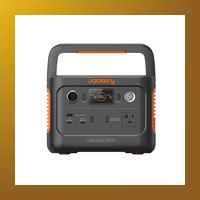
The Jackery Explorer 300 is the gold standard for simplicity. One button turns it on. The display shows remaining battery as a big, easy-to-read percentage. Plug something in, press the button, and it works.
Why it's perfect for seniors:
- One-button operation — No mode switching, no settings. Press AC button → power comes out.
- Lightweight — At 7.1 lbs, anyone can carry it from room to room.
- Quiet — No noise, no fumes. Safe to use indoors.
- Simple display — Big battery icon + percentage. Easy to read without glasses.
- UPS mode — Leave it plugged in. It automatically switches to battery power when the grid goes out. No action needed.
What it can power: CPAP machine (6-8 hours), WiFi router (24+ hours), phone charging (30+ charges), LED lights (3 days), small TV (3-4 hours).
Trade-off: Can't run a refrigerator or large appliances. For that, step up to the Explorer 500 or 1000.
🥈 Bluetti AC70 — Best Mid-Size for Seniors
Specs: 768Wh | 1000W continuous / 2000W surge | LiFePO4 | 22 lbs (10 kg) | $499
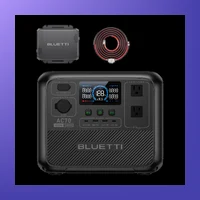
The Bluetti AC70 is the sweet spot for seniors who need more power but don't want complexity. It's bigger than the Jackery 300 but still manageable, and it adds the ability to run a refrigerator.
Why it works for seniors:
- Large, clear LCD — Shows wattage, remaining battery, and time-to-empty in big text.
- Simple AC/DC buttons — Separate buttons for outlets and USB ports. No menu diving.
- LiFePO4 battery — Safe chemistry, no maintenance, 10-year lifespan.
- UPS passthrough — Plug into the wall and forget it. It kicks in automatically when power fails.
What it can power: Mini fridge (10+ hours), CPAP (2 nights), TV + lights + WiFi (overnight), medical devices.
Trade-off: At 22 lbs, it's not as portable as smaller models. Best kept in one place (bedroom or living room).
🥈 Anker Solix C300 DC — Best Ultra-Light Option
Specs: 288Wh | 300W continuous | LiFePO4 | 7.5 lbs (3.4 kg) | $199

The Anker Solix C300 DC is the budget-friendly option that doesn't sacrifice simplicity. It's almost identical in size and weight to the Jackery 300, but at a lower price point. The control layout is intuitive: a single button to turn AC on and off, and USB ports that work without pressing anything.
The display is minimal but effective — a simple battery percentage and output wattage. Nothing confusing. It's also one of the few models that can charge via USB-C, so you don't need to hunt for the special charging brick.
Best for: Seniors on a budget who primarily need to charge phones, tablets, run a CPAP, and power lights. The low price makes it easy to buy one as a dedicated emergency unit.
🥉 EcoFlow Delta 2 — Most Power, Still Simple
Specs: 1024Wh | 1800W continuous / 2700W surge | LiFePO4 | 27 lbs (12 kg) | $799

For seniors who need serious backup power — enough to run a refrigerator, freezer, lights, and medical devices — the EcoFlow Delta 2 is the best option. Despite its power, it's surprisingly easy to use.
The touchscreen display is larger than most competitors and shows exactly what's plugged in and how much time remains. The app (optional) can be set to "Simple Mode" which strips away advanced settings. Most seniors can operate it entirely from the front panel without ever touching the app.
Key features for seniors:
- One-button startup — Press the main power button, then press AC. Done.
- Extra-large display — Easy to read remaining time and battery level.
- Battery-powered for 10 years — LiFePO4 lasts 3000+ cycles.
- Fast charging — Full charge in 1 hour AC, 4 hours solar.
Best for: Seniors who want whole-home backup capability for extended outages. The higher price reflects the much larger capacity.
What to Look for When Buying for a Senior
Use this checklist when choosing a power station for an older adult:
- Physical weight: 15 lbs or less if it needs to be moved. Over 20 lbs is hard for many seniors to manage.
- Button count: Fewer is better. Ideally one button for AC and one for DC. If there's an app, it should be optional.
- Display clarity: Large, high-contrast numbers. Avoid models with small or dim screens.
- UPS mode (must-have): The unit should stay plugged in and automatically activate when power goes out — no button pressing required.
- Setup time: Should work within 60 seconds of opening the box. If it needs app setup or firmware updates, look elsewhere.
- Wheels or handles: If the model is over 20 lbs, it should have a handle or be on a wheeled cart.
- Emergency flashlight: A simple built-in light that's easy to find in the dark.
Models to Avoid for Seniors
Some popular power stations are not ideal for seniors:
- Goal Zero Yeti Series (older models) — The app is required for some configurations, and the display shows technical readouts that can confuse non-technical users.
- Generic no-name brands — Poor build quality, no customer support, manuals are often poorly translated.
- High-end systems with inverters — Systems like the EcoFlow PowerKit or Bluetti AC500 + B500 setup require wiring and configuration. Only buy these if a tech-savvy family member can set them up.
Quick Comparison Table
| Model | Capacity | Weight | Best For | Price |
|---|---|---|---|---|
| Jackery Explorer 300 | 293Wh | 7.1 lbs | CPAP, lights, phone | $279 |
| Anker Solix C300 DC | 288Wh | 7.5 lbs | Budget backup | $199 |
| Bluetti AC70 | 768Wh | 22 lbs | Refrigerator + CPAP | $499 |
| EcoFlow Delta 2 | 1024Wh | 27 lbs | Full-home backup | $799 |
Final Tips for Family Members
If you're buying this for an older parent or relative, do this before gifting:
- Pre-charge it fully (takes 1-2 hours).
- Label the AC button with a small sticker that says "Press for Power".
- Plug in one device (a lamp) so they can see it works before an emergency.
- Write the phone number for customer support on the unit or nearby.
A good power station should bring peace of mind, not confusion. Picking one of the models above ensures the person using it will actually be able to operate it when it matters most — no manual required.
Advanced Considerations — What the Spec Sheet Doesn't Tell You
The specs on the box tell you capacity and wattage. Here's what matters for long-term ownership — battery degradation, expansion paths, and real-world gotchas that only become apparent after months of use.
Advanced: Bluetti AC70 — What to Know Beyond the Spec Sheet
- Battery longevity: 3000+ cycles to 80% capacity (LiFePO4). With daily use, this translates to 8-10 years before noticeable degradation. For weekly backup or emergency-only use, the battery will last even longer than the listed cycle count suggests.
- Expansion options: No expansion battery. What you buy is what you get — choose carefully based on future needs.
- Warranty: 5 years. No registration required — coverage starts from date of purchase.
- Temperature performance: -4°F to 104°F (-20°C to 40°C) charging. Can charge in below-freezing temperatures (down to -4°F), giving it an edge for winter emergency use.
- Solar recharging speed: With the max solar input of 500W panels, you can recharge from empty to full in 4-8 hours of direct sunlight — useful for multi-day outages without grid power.
- Weight consideration: At 22 lbs (10 kg), this is manageable for most adults to move between rooms.
Advanced: EcoFlow Delta 2 — What to Know Beyond the Spec Sheet
- Battery longevity: 3000 cycles to 80% capacity (LiFePO4). With daily use, this translates to 8-10 years before noticeable degradation. For weekly backup or emergency-only use, the battery will last even longer than the listed cycle count suggests.
- Expansion options: Supports extra battery (DB2000, +2048Wh, $699). This matters if your power needs grow over time — you can add capacity without replacing the entire unit.
- Warranty: 5 years. No registration required — coverage starts from date of purchase.
- Temperature performance: 14°F to 113°F (-10°C to 45°C) charging. Can charge in below-freezing temperatures (down to 14°F), giving it an edge for winter emergency use.
- Solar recharging speed: With the max solar input of 500W panels, you can recharge from empty to full in 4-8 hours of direct sunlight — useful for multi-day outages without grid power.
- Weight consideration: At 27 lbs (12 kg), this is manageable for most adults to move between rooms.
Ready to buy? Check the latest prices on Amazon:
Jackery Explorer 300 Bluetti AC70 Anker Solix C300 DC EcoFlow Delta 2