Portable Power Station 101 — A Beginner's Guide to Getting Started
What Is a Portable Power Station?
A portable power station is essentially a large rechargeable battery with built-in outlets. Think of it as a power bank for your phone, but scaled up to run appliances, electronics, and medical devices during a power outage or when you're away from grid power.
Unlike a gas generator, a portable power station:
- Makes zero noise — no engine sound, no exhaust fumes
- Produces no emissions — safe to use indoors (apartments, bedrooms, offices)
- Requires almost no maintenance — no oil changes, no fuel to store
- Can be recharged from a wall outlet, solar panels, or your car
- Has no moving parts — nothing to wear out mechanically
These features make portable power stations the ideal backup power solution for apartment dwellers, renters, and anyone who wants a simple, safe way to keep the lights on during outages.
How Does a Portable Power Station Work?
Inside every portable power station, there are three main components working together:
The Battery Pack
This is where energy is stored. The battery is made up of lithium-ion cells, similar to what's in your laptop or phone, just many more of them grouped together. Modern power stations use one of two battery chemistries:
- LiFePO4 (Lithium Iron Phosphate) — Longer lifespan (3,000–5,000 charge cycles), safer chemistry, better heat tolerance. This is the preferred choice for most new power stations in 2026.
- NMC (Lithium Nickel Manganese Cobalt) — Higher energy density (more power in less space), but shorter lifespan (500–1,000 cycles). Used in some older or compact models.
The Inverter
The battery stores DC (direct current) power, but most of your appliances run on AC (alternating current) power — the type that comes from a wall outlet. The inverter converts DC to AC. Pure sine wave inverters produce clean power that's safe for sensitive electronics like laptops, CPAP machines, and medical devices.
The Battery Management System (BMS)
The BMS is the internal computer that protects the battery. It monitors temperature, voltage, and current to prevent overheating, overcharging, and short circuits. A good BMS is what makes modern power stations safe to leave running unattended.
Understanding the Key Specs
When shopping for your first power station, you'll encounter these specs on every product page. Here's what they actually mean:
Watt-Hours (Wh) — The Capacity
Watt-hours tell you how much total energy the battery holds. This is your "fuel tank size."
- 200–300Wh — Enough to charge phones, tablets, and run a WiFi router for 24+ hours. Best for short outages or device charging.
- 500–700Wh — Can run a mini fridge, CPAP machine, and lights for several hours. The sweet spot for apartment backup.
- 1,000–1,500Wh — Powers a full-size refrigerator, TV, and multiple devices simultaneously. Serious home backup capacity.
- 2,000Wh+ — Can run multiple appliances for 8–12 hours. Apartment-wide backup for extended outages.
Continuous Watts — The Output Limit
Continuous watts tell you how much power the station can deliver at any moment. Every appliance has a wattage rating. A refrigerator might use 150W, a TV uses 100W, and a CPAP uses 60W. Add up the wattage of everything you want to run simultaneously — that total must stay below the station's continuous watt rating.
Surge Watts — The Starting Boost
Some appliances, especially refrigerators and pumps, need extra power for a split second when they start up. Surge watts (also called peak watts) is the maximum the station can deliver for that brief startup. A fridge that runs on 150W might need 600–900W to start. Always check surge capacity.
Battery Chemistry
As mentioned above, LiFePO4 is the better choice for longevity and safety. If you see "LiFePO4" in the specs, that's a green flag. NMC batteries are lighter but wear out faster and have stricter charging temperature limits.
What Can You Power? Real-World Scenarios
Let's look at what different-sized power stations can actually do in a real apartment:
300Wh station: Keep your WiFi router running for 2 days, charge phones and tablets for a week, run a desk lamp for 30+ hours. Great for short outages and device charging, but won't run a fridge or CPAP overnight.
700Wh station: Run a CPAP machine for 2–3 nights, keep a mini fridge cold for 8–10 hours, power a TV for 5–6 hours. This is the minimum I'd recommend for apartment emergency backup.
1,200Wh station: Run a full-size refrigerator for 6–8 hours, power a gaming console + monitor for 4–5 hours, keep medical devices running through the night. The sweet spot for most apartment dwellers.
2,000Wh+ station: Run fridge + TV + WiFi + lights + CPAP for 8–12 hours simultaneously. Enough to keep normal life running through most outages.
How to Choose Your First Power Station
Here's a simple process for picking the right one:
Step 1: List your must-run devices. Write down what absolutely needs power during an outage — medical devices, refrigerator, internet router, phone chargers, lights. Look up each device's wattage (usually printed on a label near the power cord).
Step 2: Calculate total wattage and estimated runtime. Add up the continuous watts of everything you'd run at once. Then estimate how many hours you need — a typical extended outage might be 6–12 hours. Multiply your total watts by hours to get the minimum watt-hours you need.
Step 3: Decide on battery type. LiFePO4 is almost always the better choice unless you need the lightest possible station. Pay attention to the cycle life rating — LiFePO4 stations typically last 10+ years for occasional use.
Step 4: Consider charging options. Most stations charge from a wall outlet in 1–6 hours. If you want the ability to recharge during a multi-day outage, look for a station with solar input capability — 200W–500W solar input is common on mid-range models.
Best Power Stations for Beginners
Based on our research and analysis of the current market, here are three excellent starting points depending on your needs and budget:
🥇 Our Top Pick: EcoFlow Delta 2
Specs: 1,024Wh | 1,800W continuous | 3,600W surge | LiFePO4 battery | 5-year warranty

The EcoFlow Delta 2 is the most well-rounded beginner power station on the market. With 1,024Wh capacity, it can run a refrigerator, lights, WiFi, and a CPAP machine simultaneously. The LiFePO4 battery gives it 3,000 cycles to 80% capacity — that's about 8–10 years of daily use. It recharges from empty to 80% in just 50 minutes on AC power, the fastest in its class. At approximately $899 at time of writing, it's an investment, but one that will last for years. The EcoFlow app adds smart controls, letting you monitor power usage and adjust settings from your phone.
🥈 Best Value: Jackery Explorer 1000 v2
Specs: 1,070Wh | 1,500W continuous | 3,000W surge | LiFePO4 battery | 3-year warranty (5 with registration)
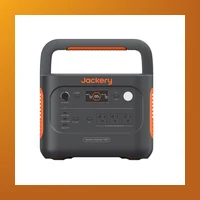
Jackery is one of the most trusted names in portable power, and the Explorer 1000 v2 is their best all-around model. Slightly more capacity than the Delta 2 at 1,070Wh, it trades faster charging for a lower price — approximately $699. The interface is simple and beginner-friendly, with clear indicators for battery level and power draw. It supports up to 400W solar input, letting you recharge from two 200W panels in 4–5 hours. At 22 lbs, it's portable enough to move between rooms but substantial enough to deliver serious backup power.
🥉 Best Expandable: Bluetti AC180
Specs: 1,152Wh | 1,800W continuous | 2,700W surge | LiFePO4 battery | 5-year warranty
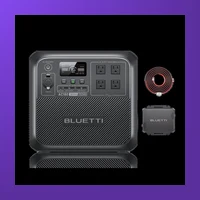
The Bluetti AC180 offers the most capacity of the three at 1,152Wh, and it supports expansion with an extra B180 battery ($549) to double capacity to 2,304Wh. This is a great option if you think your power needs might grow in the future. It recharges 0–80% in about 1 hour on AC and supports 500W solar input. At approximately $799, it's priced between the other two. The Bluetti app provides monitoring and control, plus UPS mode for seamless power switching.
Charging and Maintaining Your Power Station
One of the best things about portable power stations is how little maintenance they need, but a few simple practices will extend their life significantly:
- Store at 50–80% charge if not using for extended periods. Full discharge or long-term full charge both reduce battery lifespan.
- Recharge every 3–6 months if stored. Lithium batteries slowly self-discharge, and letting them sit at 0% for months can damage them.
- Keep in moderate temperatures. Ideal storage is 32–77°F (0–25°C). Extreme heat or cold accelerates battery degradation.
- Use it occasionally. Running the battery through a full cycle once a month helps the BMS maintain accurate capacity readings.
Frequently Asked Questions
Can I take a power station on an airplane?
Generally, power stations over 100Wh are not allowed in carry-on luggage per FAA regulations, and most portable power stations exceed this limit. Larger units must be shipped as cargo. Always check with your airline before traveling.
How long does a power station hold its charge when not in use?
LiFePO4 batteries can hold 50–80% charge for 6–12 months with minimal loss. NMC batteries discharge slightly faster. However, the BMS itself consumes a tiny amount of power, so after 6–12 months you may find the battery at 20–50% of its original charge. We recommend checking and topping off every 3 months.
Is it safe to leave a power station charging overnight?
Yes. Modern power stations have sophisticated BMS circuits that automatically stop charging when the battery reaches 100%. They also monitor temperature and will halt charging if anything gets too warm. The risk of overcharging is effectively zero with any reputable brand.
Can I use a power station while it's charging?
Most modern power stations support pass-through charging, meaning you can plug them into a wall outlet and draw power from them simultaneously. This effectively gives you a UPS (uninterruptible power supply) function — if the grid goes down, your devices stay on without interruption.
How do I know what size power station I need?
Add up the wattage of everything you want to run during an outage, then multiply by the number of hours you expect to need power. A fridge (150W) running for 8 hours needs 1,200Wh. If you add a TV (100W, 4 hours = 400Wh) and WiFi router (10W, 24 hours = 240Wh), your total is 1,840Wh. Get a station with at least this much capacity, and ideally 20–30% more for margin.
Ready to buy? Check the latest prices on Amazon: