Battery Backup for CPAP in Apartment — 2026 Life-Saving Guide
Why CPAP Users in Apartments Need a Plan
For the 30 million Americans who depend on CPAP therapy, a power outage isn't just an inconvenience — it's a legitimate medical emergency. Obstructive sleep apnea (OSA) affects roughly 1 in 3 adults, and the sudden loss of positive airway pressure means breathing stops, oxygen saturation drops, and the heart works harder. Within a single night without CPAP, blood pressure rises, atrial fibrillation risk increases, and next-day cognitive function plummets.
Apartment dwellers face a unique challenge that house owners don't. Gas generators are banned in virtually all multi-unit buildings — they violate fire codes, lease agreements, and common sense. Even running one on a balcony is dangerous: carbon monoxide can seep through open windows, ventilation shafts, and shared walls into your unit and your neighbor's. The CDC reports that generator-related CO poisoning kills over 70 people annually, and many of those deaths occur in apartment buildings where the generator was placed "safely" outside.
A portable power station is the only safe, practical, and legal solution for apartment CPAP users. It produces zero emissions, runs silently, and seamlessly takes over when the grid goes down. But with dozens of models on the market — ranging from 200 Wh to over 2,000 Wh — choosing the right one requires understanding your CPAP's power draw, your preferred settings, and how many nights of backup you realistically need.
This guide walks through everything: CPAP power consumption by model, estimated runtimes for popular power stations, detailed product recommendations, setup tips, and answers to the most common questions CPAP users ask when preparing for an outage.
How Much Power Does a CPAP Machine Need?
CPAP machines draw surprisingly little power compared to appliances like refrigerators or space heaters. But the exact wattage varies significantly based on the machine model, pressure setting, heated humidifier use, and heated tube use.
The table below shows real-world power consumption for the most common CPAP and bilevel models on the market. These values assume a typical therapeutic pressure of 10-12 cmH₂O. Higher pressures (15-20 cmH₂O) will increase wattage by roughly 10-20%, while lower pressures (5-8 cmH₂O) may reduce it.
| CPAP Model | Type | Watts (no humidifier) | Watts (with humidifier) | Nightly Wh (8 hrs, no hum.) | Nightly Wh (8 hrs, with hum.) |
|---|---|---|---|---|---|
| ResMed AirSense 10 | CPAP/APAP | 30-53 W | 53-104 W | ~320 Wh | ~600 Wh |
| ResMed AirSense 11 | CPAP/APAP | 25-45 W | 45-90 W | ~280 Wh | ~540 Wh |
| ResMed AirCurve 10 | BiPAP | 35-60 W | 58-115 W | ~380 Wh | ~690 Wh |
| ResMed AirMini | Travel CPAP | 18-30 W | N/A (no built-in) | ~190 Wh | N/A |
| Philips DreamStation 2 | CPAP/APAP | 28-50 W | 50-95 W | ~300 Wh | ~560 Wh |
| Philips DreamStation Go | Travel CPAP | 15-28 W | 28-50 W | ~170 Wh | ~310 Wh |
| Löwenstein Prisma 20A | CPAP/APAP | 25-48 W | 48-88 W | ~290 Wh | ~520 Wh |
| Fisher & Paykel SleepStyle | CPAP/APAP | 30-55 W | 55-110 W | ~340 Wh | ~660 Wh |
| Transcend Micro | Travel CPAP | 12-22 W | N/A (no built-in) | ~140 Wh | N/A |
Key takeaway: Running your CPAP without the heated humidifier cuts power consumption by nearly half. If you can tolerate dry air for a night or two, your battery backup will last roughly twice as long. Travel CPAP models like the AirMini or Transcend Micro use substantially less power and are excellent options for extended power outages.
Heated tube functionality adds another 10-20W on top of the humidifier draw. If your power station is marginal on capacity, turn off the heated tube setting and use an unheated standard tube instead.
Runtime Table: How Long Each Power Station Will Last
The table below provides real-world runtime estimates for the most popular portable power stations paired with common CPAP models. These calculations use a 10-12 cmH₂O pressure setting with and without humidifier. Actual runtime will vary based on pressure, ambient temperature, and whether the power station runs in UPS (idle) mode or is switched on only when needed.
| Power Station | Capacity | CPAP Model | Runtime (no hum.) | Runtime (with hum.) |
|---|---|---|---|---|
| Jackery Explorer 300 | 293 Wh | AirSense 11 | ~1 night | ~5 hours |
| Jackery Explorer 500 | 518 Wh | AirSense 11 | ~1.8 nights | ~1 night |
| Jackery Explorer 1000 v2 | 1,070 Wh | AirSense 11 | ~3.8 nights | ~2 nights |
| EcoFlow River 2 | 256 Wh | AirSense 11 | ~0.9 night | ~4.5 hours |
| EcoFlow River 2 Pro | 768 Wh | AirSense 11 | ~2.7 nights | ~1.4 nights |
| Bluetti EB55 | 537 Wh | AirSense 11 | ~1.9 nights | ~1 night |
| Bluetti AC180 | 1,152 Wh | AirSense 11 | ~4.1 nights | ~2.1 nights |
| Jackery Explorer 1000 v2 | 1,070 Wh | AirSense 10 | ~3.3 nights | ~1.8 nights |
| Bluetti AC180 | 1,152 Wh | AirSense 10 | ~3.6 nights | ~1.9 nights |
| EcoFlow River 2 Pro | 768 Wh | DreamStation 2 | ~2.5 nights | ~1.3 nights |
| Jackery Explorer 500 | 518 Wh | AirMini | ~2.7 nights | N/A |
Runtime is calculated as: (Power Station Capacity × 0.85) ÷ Nightly Consumption. The 0.85 factor accounts for inverter conversion loss (~15%), which is standard for pure sine wave inverters in portable power stations. Using a DC-to-DC cable (if your CPAP supports it) eliminates that loss and increases effective runtime by 15-20%.
Best Power Stations for CPAP in Apartments
1. Jackery Explorer 1000 v2 — Best Overall CPAP Backup
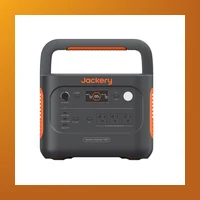
Jackery Explorer 1000 v2
$999 · 1,070 Wh · 22 lbs · UPS mode (20ms)
The Jackery Explorer 1000 v2 is the gold standard for CPAP backup. With 1,070 Wh of capacity, it powers a ResMed AirSense 11 with humidifier for two full nights, or nearly four nights without the humidifier. The UPS mode switches from grid to battery in under 20 milliseconds — faster than your CPAP can detect. Your machine keeps running without a hiccup, which means no disrupted therapy and no restart ramp cycle.
At 22 pounds, it's light enough to move from the bedroom to the living room during the day. The pure sine wave output is clean enough for sensitive electronics, and the LCD display shows remaining runtime at a glance. The built-in MPPT charge controller allows solar recharging if you have a balcony panel, extending your backup indefinitely during prolonged outages.
2. Jackery Explorer 500 — Best Budget CPAP Backup
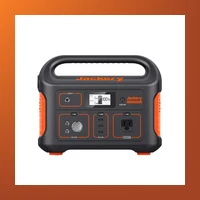
Jackery Explorer 500
$449 · 518 Wh · 13.3 lbs · UPS mode (30ms)
The Jackery Explorer 500 is the sweet spot for CPAP users who need reliable single-night coverage without overspending. At 518 Wh, it runs an AirSense 11 without humidifier for 1.8 nights, or roughly one full night with the humidifier on. For most apartment dwellers in urban areas where grid power is restored within 4-8 hours, this is more than enough buffer.
It weighs just 13.3 pounds — easily carried with one hand. The form factor is compact enough to fit on a nightstand or under a bed. Like its larger sibling, it features a pure sine wave inverter, UPS mode with 30ms switchover, and can be recharged via solar, car, or wall outlet. If you're on a tight budget or have limited floor space, this is the most practical option.
3. EcoFlow River 2 — Ultra-Compact CPAP Solution
EcoFlow River 2
$279 · 256 Wh · 7.7 lbs · UPS mode (30ms)
The EcoFlow River 2 is the most portable CPAP backup you can buy. At just 7.7 pounds and roughly the size of a shoebox, it slides into a backpack or drawer with ease. Its 256 Wh capacity runs an AirSense 11 without humidifier for roughly one night, making it ideal for short outages (2-6 hours) or as a supplemental backup to a larger power station.
The River 2 charges from 0-100% in just 60 minutes via AC wall power, which is the fastest recharge time in its class. If the outage lasts longer than a single night, you can recharge it during the day at a friend's place or coffee shop. It also supports solar charging at up to 110W. The 30ms UPS switchover is fast enough to keep your CPAP running through a grid transition. This is an excellent choice for studio apartments or renters who prioritize portability above all else.
4. EcoFlow River 2 Pro — Best Value CPAP Backup
EcoFlow River 2 Pro
$549 · 768 Wh · 17 lbs · UPS mode (15ms)
The River 2 Pro strikes the best capacity-to-price ratio on the market. At 768 Wh for $549, it provides 2.7 nights of CPAP therapy without humidifier, or 1.4 nights with it. The 15ms UPS switchover is the fastest in its price class, ensuring absolutely seamless power transitions. X-Boost mode lets it power devices up to 1600W, so you can also run a small fan or phone charger alongside your CPAP.
At 17 pounds, it's light enough to carry between rooms but substantial enough to provide meaningful multi-night backup. The LCD display is clear and informative, showing input/output wattage in real time. If you want the best bang for your buck, this is the model to choose.
5. Bluetti EB55 — Mid-Range CPAP Powerhouse
Bluetti EB55
$499 · 537 Wh · 16.5 lbs · UPS mode (20ms)
The Bluetti EB55 occupies a nice middle ground between the ultra-portable EcoFlow River 2 and the high-capacity Jackery 1000 v2. With 537 Wh of LiFePO₄ battery capacity, it runs an AirSense 11 without humidifier for nearly two nights. The lithium iron phosphate chemistry is a major advantage: LiFePO₄ batteries last 3,500+ charge cycles (roughly 10 years of daily use), compared to 800-1,000 cycles for standard lithium-ion packs.
It's also one of the few power stations in this class with wireless charging on top — convenient for keeping your phone topped up during an outage. The 20ms UPS switchover protects your CPAP from interruption. Six output ports (3 AC, 2 USB-A, 1 USB-C, 1 DC car port) give you plenty of flexibility to charge multiple devices overnight. If you want a long-lasting power station that you'll still be using a decade from now, the EB55's LiFePO₄ battery makes it the smart choice.
6. Bluetti AC180 — Best for Extended Outages
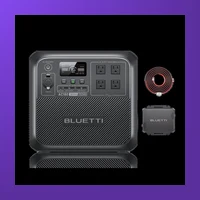
Bluetti AC180
$899 · 1,152 Wh · 37 lbs
The AC180's 1,152 Wh capacity provides 2 nights with humidifier or 4+ nights without. If you live in an area prone to multi-day outages — hurricane zones, wildfire PSPS regions, or areas with aging grid infrastructure — this is the safest bet. It also uses LiFePO₄ chemistry for exceptional cycle life. The AC180 charges from 0-80% in just 45 minutes, so you can top it up quickly between shifts at work or during a brief return of grid power.
CPAP Settings That Maximize Battery Life
Your CPAP machine's settings dramatically affect battery runtime. Here are the adjustments that make the biggest difference during an outage:
- Turn off the heated humidifier: This is the single biggest power saver. The humidifier accounts for 40-50% of total power consumption. If you can tolerate dry air for a few nights, your battery backup will last nearly twice as long.
- Disable the heated tube: If your machine uses a ClimateLine or heated tubing, turn it off in the settings menu. Heated tubes draw an additional 10-20W.
- Reduce max pressure if possible: Higher pressures require more blower power. If your prescribed pressure range is 8-14 cmH₂O, the machine spends most of the night at the upper end. Ask your sleep specialist if a lower fixed pressure is acceptable for short-term outage use.
- Disable ramp or set it to minimum: The ramp feature starts at low pressure and gradually increases, which draws varying power. Disabling it or setting the shortest ramp time stabilizes power consumption.
- Use airplane mode: Cellular and Bluetooth modules in modern CPAPs draw small but measurable power. Turning off wireless connectivity saves a few extra watt-hours.
- Use DC power when available: Many CPAP models (ResMed, Philips) have a DC input that accepts 12V or 24V direct current. Using a DC cable eliminates the 15% inverter conversion loss, giving you more usable runtime.
CPAP Battery Backup Checklist
- Check your machine's wattage: Look on the power brick or in the manual. Most CPAPs draw 30-60W without humidifier and 50-110W with humidifier. If the sticker says "90W max," use 80-90W for your calculations.
- Measure your actual consumption: Use a Kill-A-Watt or similar power meter to measure your exact setup over one night. This gives you a precise Wh number instead of estimating from averages.
- Skip the humidifier during outages: It doubles power draw. Use it only if medically necessary for your airway health.
- Use a DC converter if possible: Some CPAP models have a DC input that bypasses the AC-to-DC conversion loss, extending battery life by 15-20%.
- Keep your machine plugged into the power station: Use UPS mode (if available) so it automatically switches during an outage without you waking up.
- Buy 1.5x your nightly needs: If your CPAP uses 300 Wh per night, get at least 450 Wh capacity. This gives you buffer for longer outages, higher pressure settings, or running a phone charger alongside your machine.
- Test the setup before an outage: Run your CPAP from the power station for a full night. Check that the UPS switchover is silent, the fan noise doesn't disturb you, and the runtime meets expectations.
- Store the power station charged: Keep it at 80% charge for long-term storage. Check every 3 months and top up if it's dropped below 50%.
What Not to Do
- Don't use a car inverter + extension cord setup. Running your CPAP from a car battery via a 12V-to-AC inverter is inefficient and dangerous. The inverter drains your car battery in a few hours, leaving you stranded. Idling the car to recharge produces CO that can seep into your apartment. Car batteries aren't designed for deep discharge cycles and will fail prematurely.
- Don't rely on USB power banks. Most CPAP machines require pure sine wave AC power at 110-120V. Standard USB power banks output 5V DC, which won't work without an expensive voltage converter. Even if you find a 120V AC output power bank, most use modified sine wave inverters that can damage CPAP motors over time.
- Don't daisy-chain multiple small batteries. Some users try plugging one power station into another to extend runtime. This creates double conversion losses (AC-DC-AC), wastes 25-30% of total capacity, and introduces potential ground loop issues.
- Don't buy a generator. Gas and propane generators are banned in virtually all apartment buildings. Even if your building allows them on balconies, CO poisoning risk is real. The National Institute of Standards and Technology found that CO from a generator on a balcony can reach lethal concentrations inside an apartment within 10 minutes.
- Don't ignore fan noise. Some budget power stations have loud cooling fans that kick on under load. If the power station is in your bedroom, the fan noise may disturb your sleep. Read reviews specifically mentioning "fan noise" and test your unit before relying on it.
- Don't wait until an outage to test your setup. Test it on a normal night first — make sure the power station's fan doesn't disturb your sleep, verify the runtime matches your expectations, and confirm the UPS transition works seamlessly.
Frequently Asked Questions
Can I run my CPAP all night on a portable power station?
Yes — most portable power stations above 500 Wh can run a CPAP for a full 8-hour night. The key is matching the power station capacity to your machine's consumption. An AirSense 11 without humidifier uses ~280 Wh per night, so even a 300 Wh power station covers one night. With humidifier, you need at least 500-600 Wh for a full night's coverage.
How long will a Jackery 500 run a CPAP machine?
A Jackery Explorer 500 (518 Wh) runs a ResMed AirSense 11 without humidifier for roughly 1.8 nights (about 14-15 hours), or about one full night with the humidifier on. For an AirSense 10 with humidifier, expect about 12-13 hours. For a low-power travel CPAP like the AirMini, the Jackery 500 can last 2.5-3 nights.
Can I use a power bank instead of a power station for CPAP?
Standard USB-C power banks won't work because CPAP machines need 110-120V AC power. Some newer USB-C PD power banks with 140W+ output paired with a USB-C to DC adapter cable may work with specific CPAP models (check your machine's compatibility), but this is an advanced setup. For most users, a proper portable power station with a built-in pure sine wave inverter is the simpler and safer choice.
Does the EcoFlow River 2 have UPS mode for CPAP?
Yes, the EcoFlow River 2 has a UPS mode with approximately 30ms switchover time. This is fast enough to keep a CPAP machine running through a power transition without interruption. To enable it, keep the River 2 plugged into the wall and your CPAP plugged into the River 2's AC output. When the grid goes down, the unit switches to battery power in milliseconds.
How many nights will a Bluetti EB55 power my CPAP?
The Bluetti EB55 (537 Wh) powers a ResMed AirSense 11 for approximately 1.9 nights without humidifier (about 15 hours) or roughly 1 night with humidifier. For travel CPAP models like the AirMini, it provides 2.5-3 nights of therapy. The EB55's LiFePO₄ battery also means it will last for thousands of charge cycles without significant degradation.
Should I get a power station with LiFePO₄ or lithium-ion battery?
LiFePO₄ (lithium iron phosphate) is the better choice for CPAP backup. It lasts 3,500-5,000 charge cycles versus 800-1,000 for standard lithium-ion. It's also safer — LiFePO₄ is chemically more stable and less prone to thermal runaway. The only trade-off is slightly lower energy density, meaning LiFePO₄ units are marginally heavier for the same capacity. For a CPAP backup that sits for months between uses, LiFePO₄ is the clear winner.
Can I recharge my power station during a multi-day outage?
Yes — most portable power stations support multiple recharging methods. Solar panels (100-200W) can fully recharge a mid-size power station in 4-8 hours of direct sunlight. Many apartment dwellers keep a 100W folding solar panel on their balcony or near a window. Car charging is also an option: you can recharge from your vehicle's 12V outlet while running errands. Some power stations also support fast AC recharging (60-80% in under an hour), so a brief return of grid power can top you up significantly.
Is it safe to keep a portable power station in the bedroom while I sleep?
Yes — modern portable power stations use sealed lithium or LiFePO₄ batteries that produce no fumes and are safe for indoor use. Unlike generators, they produce zero emissions. The only concern is fan noise: some units run cooling fans when under load or during charging. Place the power station at least 12 inches from walls for airflow, and test it in your bedroom before relying on it during an actual outage.
Final Verdict
Your CPAP therapy is non-negotiable, and a power outage shouldn't force you to choose between safety and comfort. For most apartment dwellers, the Jackery Explorer 1000 v2 is the optimal all-around choice — it provides 2+ nights of backup, has instant UPS switchover, and is lightweight enough to move between rooms.
If budget is your primary concern, the Jackery Explorer 500 ($449) reliably covers one night with humidifier or nearly two nights without. For the best capacity-to-price ratio, the EcoFlow River 2 Pro at $549 delivers 768 Wh and the fastest UPS switchover in its class. If long-term durability matters most, the Bluetti EB55 with its LiFePO₄ battery will still serve you reliably a decade from now.
The bottom line: buy a power station with at least 500 Wh capacity, test it before you need it, and disable the humidifier during outages unless medically required. With the right setup, you'll sleep soundly through any power outage — literally.